Email QA Agent
Key Result: 55 hours/month of manual QA time reclaimed Layer: Control Problem: QA Bottlenecks Status: Live
Home • Agent Registry • Results • Roadmap • Campaign & Commercial Projects • Leadership & Strategy • How to Build MOCC • HubSpot Expert in South Wales
Layer: Control — Quality Assurance
Status: Live
Platform: Microsoft Copilot Studio · Power Automate · SharePoint · Microsoft Teams · Marketing Automation Platform
Deployment: Veriforce — 5 brands
Last updated: June 2026
Version: 1.3
Business Problem
Email quality checks were carried out manually by several people. The checks were not always consistent, findings were recorded in different places and the review could hold up campaign deployment.
The team needed one repeatable process, with a clear record of the checks and issues found.
Solution Overview
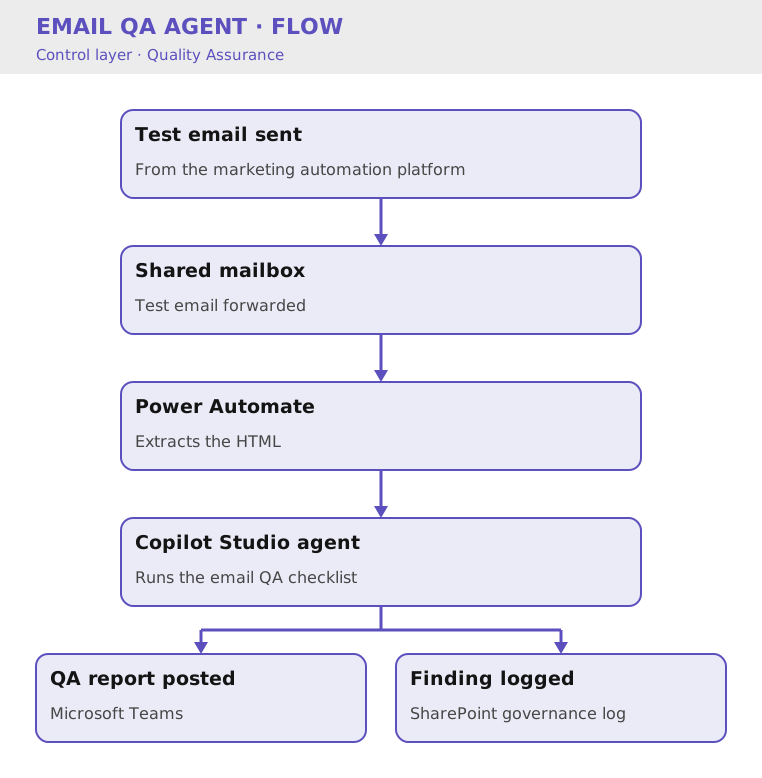
A test email is sent to a shared mailbox. Power Automate extracts the HTML and passes it to a Microsoft Copilot Studio agent, which checks it against the agreed QA criteria. The report is posted to Microsoft Teams and the findings are saved in SharePoint.
The process works with test emails from the marketing automation platform, so the team does not need to learn a separate submission process.
Business Value
- Reclaimed an estimated 55 hours of manual QA time each month across five brands
- Made the checks consistent across campaigns
- Created a searchable QA history in SharePoint
- Gave campaign owners a clearer view of issues before deployment
- Reduced the time spent on routine checklist work
Cost Savings
- Time reclaimed: 55 hrs/month across 5 brands = £1,375/month = £16,500/year at the MOCC’s illustrative £25/hour rate
- Compliance benefit: The SharePoint record gives the team an audit trail of checks and findings
- Team benefit: The Marketing Automation Executive can spend less time on routine checks and more time on workflow improvement
Version History
| Version | Date | Milestone |
|---|---|---|
| v1.0 | March 2026 | Initial prototype using manual HTML submission |
| v1.1 | April 2026 | Simplified submission via shared mailbox |
| v1.2 | June 2026 | Event-driven automation with Power Automate |
| v1.3 | June 2026 | Governance reporting to Teams and SharePoint |
Design Insights
The biggest improvement was making the process easy to use. Early versions asked people to upload screenshots and HTML manually. Moving to a shared mailbox meant users could send a standard test email and let the checks run in the background.
Explore Other MOCC Modules
- Agent Health Monitor: Agent Health Monitor
- Agent Intake & Approval Agent: Agent Intake & Approval Agent
- CRM Health Agent: CRM Health Agent
- Campaign Build Agent: Campaign Build Agent
- Campaign Performance Agent: Campaign Performance Agent
- Clarity Website Analyst: Clarity Website Analyst
- Content Agent: Content Agent
- Data Import Agent: Data Import Agent
- Email QA Agent: Email QA Agent
- Website QA Agent: Website QA Agent
- WordPress Post Creation Agent: WordPress Post Creation Agent