Agent Health Monitor
Key Result: Silent agent failures identified and flagged to the team Layer: Governance Problem: Silent failures on scheduled agent runs Status: Live
Home • Agent Registry • Results • Roadmap • Campaign & Commercial Projects • Leadership & Strategy • How to Build MOCC • HubSpot Expert in South Wales
Layer: Governance
Status: Live
Platform: Microsoft Copilot Studio • SharePoint • Microsoft Teams • Outlook
Deployment: Veriforce — 5 brands
Last updated: November 2026
Version: 1.0
Business Problem
Scheduled agents carry the risk of failing silently: a run does not happen or does not complete, and nobody notices until the output is missing. Agent review dates can also slip, so live agents drift without anyone checking them. With a growing number of live agents, there was no single view of whether each one was running as expected.
Solution Overview
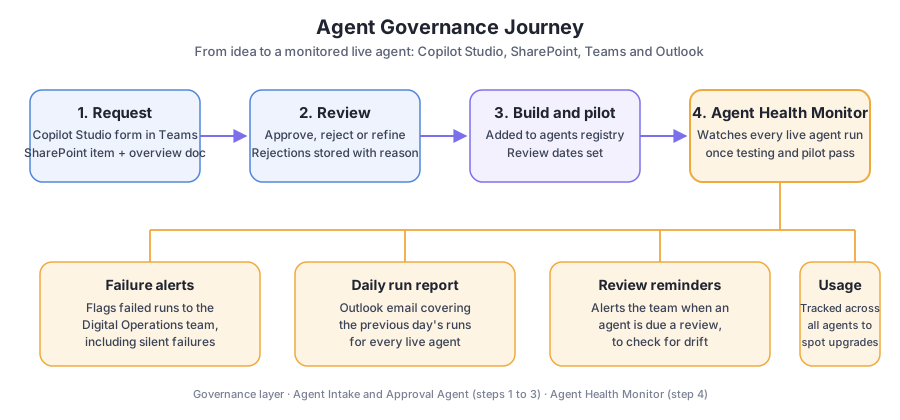
The Agent Health Monitor picks up where the Agent Intake & Approval Agent leaves off. Requests are approved and added to the agents registry with review dates; once an agent has been built and has passed testing and pilot, the Health Monitor starts watching it. It monitors every live agent run and flags any failure to the Digital Operations team, which matters most for scheduled runs where a failure can otherwise go unseen. An Outlook email report covers the previous day’s runs, and the team is alerted when an agent is due a review. It is built in Copilot Studio, SharePoint and Teams.
Business Value
- Failed runs are flagged to the Digital Operations team, including silent failures on scheduled runs
- A daily Outlook email report covers the previous day’s runs
- The team is alerted to any agent due an upcoming review, so drift is checked on a set rhythm
- Usage is tracked across all agents, highlighting potential enhancements
- Success is measured by the number of silent failures identified
Cost Savings
- Time reclaimed: 8 hrs/month = £200/month = £2,400/year at the MOCC’s illustrative £25/hour rate
- Operational impact: Helps prevent 1–2 missed reports/month, reducing the risk of stakeholder escalation; estimated impact avoided remains a separate, non-cash reliability benefit
- Reliability value: Enables the team to trust agents for mission-critical daily/weekly tasks
Version History
| Version | Date | Milestone |
|---|---|---|
| v1.0 | November 2026 | Monitoring of all live agent runs with failure alerts, a daily Outlook run report, review-due alerts and usage tracking |
Design Insights
Monitoring starts only after an agent has passed testing and pilot, and it relies on the registry and review dates created at approval. Together with the Agent Intake & Approval Agent, it covers the journey from request to long-term health.